Logitech

- See all


Left click button double clicks while selecting text or drag and drop. Its a failure in click board and a very common issue. I only occasionally used… Read more
this mouse and it failed me shortly after the one year warranty window closed. Logi did not do offer a replacement. Apart from this issue, it is over priced for what it offers.

no warranty even thou this is a design or manufacturing fault . Cable insulation should last decades – had a problem just outside of warranty expiry the 240 volt to 5 volt power supply output cables insulation had come off and caused wires to short circuit

The keys are so clicky and satisfying to type on, plus it feels solid and well-built. Makes typing smooth and enjoyable definitely worth it for anyone who types a lot.

I'm sorry to all those uninitiated people writing these "reviews" of the Logitech systems. Logitech make about the worst, muffled, shabby and… Read more
terrible speakers I've ever heard. The Z623 sounds muffled, inaccurate, terrible. It sound like it is encased in concrete, and all I can say is if any of these reviewers heard the Neumann KH-120 mkii Studio Monitors back-to-back with the Logitechs then they'd know what I am talking about. Or even just a little Audioengine A2+.
The ONLY thing these speakers have is a big subwoofer that produced (relatively) deep bass, that is the only thing they have going for them and the 2 stars is for the sub, not the satellites.
Heck, these speakers do not even have tweeters! The treble is grossly over-EQ'ed, and sounds dreadful.
The problem is these reviewed have no idea, and are used to $35 plastic computer speaker boxes or other cheap rubbish. They just hear how deep and extended the bass goes, and on that alone, decide these sound great. They do NOT. One dead give away these reviewers have no qualifications: There is no such thing as "THX certified speakers" at all - that is just a marketing ploy and means nothing objectively in the world of analogue and digital electronics and acoustics. Every aspect (bar the sub's large cone) of these Logitech speakers is wrong, horrible, and results in terrible sound, which is also so muffled that we can't hear it's full putrid expression. How anyone thinks these are "crystal clear" is beyond me.
Granted, these are very cheap speakers, and you get a sub for the price, but still so sickly that I would not touch them. Look elsewhere, even if you have to spend more money.
Buyer beware.

Poor performance of ketboard keys – Worse keyboard I have ever owned. Some keys stick and the' B' key is unresponsive most of the time. I have cleaned the keyboard and keys with… Read more
compressed air and it works for about a day then back to unresponsive keys and it is just 6 months old. So far I have replaced Logitech mechanical keyboards every year for past 4 years. Never buying Logitech keyoards anymore thay are rubbish.

Great camera for Apple HomeKit users – If you are an existing user of Apple HomeKit compatible smart products I strongly recommend this option for security cameras. If you are not I… Read more
suggest you scroll on as you need the following for this camera: - iCloud storage - Apple Hub (Apple TV or iPad) - Apple HomeKit set up
Our home is set up with Smart HomeKit compatible products so it was a breeze to set up. If you are still reading- this is an excellent product. The camera quality is high both day and night (black&white@ night). Sensors are excellent and hardware is high quality. Annoyingly has a white cable with a black camera? Honestly that is my only gripe.
All our cameras are outdoors - I have four other security cameras compatible with Foscam or Cammy software. The Circle View is far superior in view & build quality and general ease of use. It is a fish bowl style lense (see pic) and the tilt function makes it easy to mount. Sound quality is excellent.
It’s early days, I have had running for 3 weeks. We live in the tropics and have found our security cameras fail after about 2 years. The ongoing heat seems to impact them. Will advise if the CV needs replacing. Only time will tell.
Highly recommend for existing HomeKit peeps. Bought mine online through the Apple store.
I’m back. Two Logitech Circles are brilliant. It’s been a few months now. We went away and it worked perfectly watching from afar. We even had a criminal apprehended based on footage! Sound is amazing. We can hear conversations. Picks up packages, people and vehicles if you choose. So happy with this purchase. Thanks Logitech and Apple!

- See all


I purchased a Boom 3 speaker 2 and a half years ago and have been very happy with it. Sturdy and music quality has been excellent. Then it stopped… Read more
working! I was able to work out that the bluetooth microprocessor had stopped working (no light otherwise started up). I contacted Logitech and told them it was only just out of warranty....this was not good enough. After an online discussion with support they agreed to replace it. 2 days later a Boom 4 arrived!! Excellent support from a great brand. Very happy customer.

- See all


Fantastic mouse, but left button died after two years – I was ecstatic to find a great mouse for my iPad… it changed the ipad into a “full laptop replacement” for me. I would rate the mouse itself as… Read more
5-star, but I knocked it down to 4-star as it wore out faster than I hoped.
It worked brilliantly for two years. Then the left button started to feel “heavy”… a little harder to push, and then many clicks started to be missed. And it got progressively worse over about two weeks. Other posts indicate that the contacts start to die, or the micro-button itself starts to seize up. Not sure which.
Admittedly I did use it a lot, probably 5 hours a day, so about 3,000 hours. But I have never had a mouse die like this on me before.
I still bought a replacement one (M350s) and I hope this one lasts longer.

Unreliable and Disappointing – At first the mouse worked well. However, after about four months, it stopped working reliably. I tried reinstalling and researched advice without success. I don't recommend this mouse if you need reliable office equipment.

- See all


Comfortable keyboard, That's all about it. The Worst Keyboard I've ever used. The keyboard disconnects while using and trying to connect to other PCs which doesn't exist and really frustrating. Would you buy this product again? Not for a $1

- See all


On Monday 14th September 2020 I purchased this but it never worked and there was no sound coming out of the speakers or the subwoofer so I wouldn't recommend buying this because it is a waste of money.

On Thursday night 11th December 2025 I threw the speaks and the subwoofer in the recycle bin… Read more

Don’t waste your money – I have previously reviewed this and gave it higher. Until using it for several months. I have the full size numerical keyboard as I work with numbers… Read more
all day. The stupid keyboard has a num lock? Why would you need a num lock on a numerical keyboard IT SHOULD BE ON ALL THE TIME. It is constantly coming off causing constant errors and delays in typing when I look up and the cursor is jumping around and no numbers being input. What a stupid stupid keyboard and complete waste of money. There is absolutely no need for a num lock as this is a NUMERICAL KEYBOARD and there are no other functions on 90% of the numbers. Sort it out Logitech. I’m getting a new keyboard and never buying logi again.

“Silent” – Excellent keyboard for the first 3 months of use then keys start getting noisier and noisier and 12 months on there’s no difference in noise between the “silent” keyboard and a standard

I bought the Logitech K855 Wireless Mechanical Keyboard on 31/05/2023 from JB Hi-Fi for $74. The keyboard was great during the first year of… Read more
ownership, but subsequently developed a frustrating keystroke issue, and Logitech Support has been unhelpful.
The Good Stuff:
- The build quality of the keyboard is quite good for it's price, it's sturdy, weighty and the keys have a satisfying click sound.
- The battery life is fantastic. I've only had to change the batteries twice during the 32 months I've had the keyboard.
- The 'easy-switch' keys (to the right of the Esc key) let me switch between devices, so I can switch between my previously paired Windows and Mac machines. This works surprisingly well, albeit sometimes with 3-5 seconds of lag, which isn't a big deal.
The Bad Stuff:
- Around 14 months into ownership, my “T” key began occasionally failing to register. It happened sporadically, but also often enough to suggest something was wrong. I contacted Logitech Support, and they asked me to go through the same troubleshooting steps I’d already tried before contacting them. When those didn’t work, I was told there was nothing they could do because the 12-month warranty had expired. I was only 2 months over.
- The above issue has been progressively getting worse over time. The 'T' key will now frequently not register, which has destroyed my typing speed, because I have to go back and fix a missed 'T' on almost every line. I have exhausted a bunch of troubleshooting and remediation steps since - nothing works.
- It’s disappointing to have to replace a keyboard after just 2.5 years, especially when it’s been well cared for and never physically damaged. A keyboard - particularly one marketed as premium - should last longer than that.

You CANNOT change the zoom on this webcam. So unless you are happy to sit a long way from your desk when talking to someone, the video camera will… Read more
either show a close up of your face, or if you lean on your desk (like I do) the top and bottom of your head get cut out. This camera gets rave reviews because yes, it does well in all aspects apart from lack of being able to control the zoom.

the best speakers for pc i had i got them over a year got heavy bass good surround sound still going strong looking to purchase another for my tv over sound bar i dont care if karens leave bad reviews i like it

I bought this keyboard and mouse combo to replace my old Microsoft combo which lasted me 15 years. Unfortunately this piece of junk didn't even make… Read more
it 2 years before playing up. The problem isn't with the keyboard or mouse but with the dongle they supplied. It started playing up and randomly not working with the only fix being to take it out and plug it back in again (and sometimes this doesn't even fix the problem). I have tried it on different computers and it seems worse on laptops, but it has become so frustrating that I'm going to have to replace it. I have also replaced all batteries but the problem persists. I looked into seeing if Logitech can supply a replacement dongle but they don't even have this model listed on their website anymore! I like the keyboard and mouse but to not even get 2 years out of this is a joke. Looking to buy a different brand for the next one but might be difficult as it looks like Logitech has a monopoly on the laptop/mouse market.

Great value for the money – I purchased a new HP all in one desktop computer and was surprised and annoyed that it did not have a wireless mouse and keyboard. The HP keyboard… Read more
was not user friendly and not at all like my previous Microsoft keyboard. I could have kept my old Logitech wireless mouse, but I was able to buy the combo package and I am very happy with it. No more clutter on my desk. The shelf price was $79 but they dropped that to $65 and as I had $40 of in-store credits that were close to expiry, I picked it up for $25.

- See all

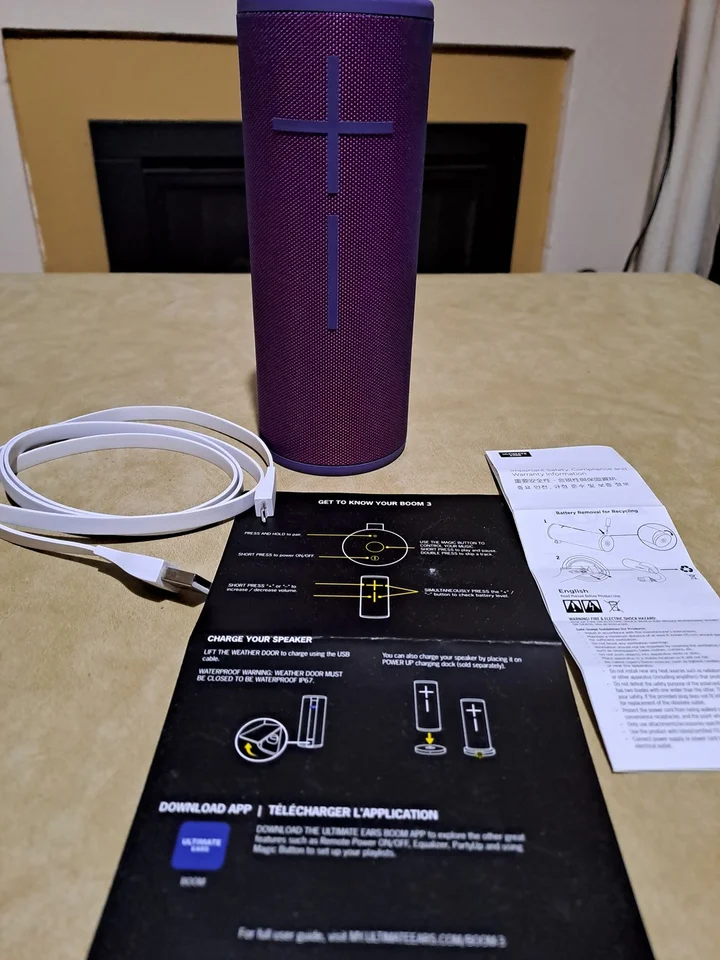


I’m finally reviewing this product after 4 years of ownership. This little thing is a beast with intense sound and amazing bass. I’ve taken it… Read more
everywhere with me travelling. I’m surprised it’s last this long with the sound still being crisp. A great product! You can’t go wrong.

- See all


This is an easy keyboard to use, but lacks the volume up/dn keys as the old keyboards did.

solid keyboard, decent feel. Solar too!! – Full sized keyboard with solar battery recharge capability! Wow! doesn't require strong light to keep charge.. ambient light is good enough.. solar… Read more
app can be bit flaky connecting so not sure what the go with that is as i sometimes can't check how much charge i'm receiving..
solar panels have a glossy feel which will get dirty over time..connects via unifying device.. wish it could be bluetooth though.. No backlit keys unfortunately but the feel of this keyboard is lovely.
Ability to tilt the keyboard on angle but they feet do feel a little flimsy. A quiet keyboard means i won't be disturbing others when typing..

CLEAR CRISP SOUND – I brought a pair at $48, set them up on the laptop, and was quite pleased as to their quality of sound, SO much better than the laptop speakers by far, I recommend them..

- See all


Excellent mouse for 2 years office use, then the left button started missing clicks requiring harder presses. The mouse wheel is fantastic but i… Read more
hardly use it and it doesn't scroll left and right in Excel.
Battery life is excellent. Ergonomics is perfect for my smaller hands. Tracking is above average but not good on reflective glossy surfaces.
There are 4 extra buttons which need the new Logi Options+ software. The software is unstable and keeps failing requiring manual termination and restarting so the buttons work again. It also needs frequent updates so i don't like it. Going back to simpler Logitech and Microsoft mice.
I also use it with the rather expensive MX Keys keyboard which i love but is let down by this software.

Competitively priced among mice offering similar qualities and capabilities – The Logitech G PRO X Superlight 2 is a standout gaming mouse renowned for its featherweight design and exceptional performance. Weighing just 58… Read more
grams, it offers swift movements and precise aiming, ideal for competitive gamers. Its sleek, ambidextrous design ensures comfort, while the wireless connectivity delivers lag-free responsiveness. However, its premium price and lack of customizable weights might deter some users. Overall, it's a top choice for those prioritizing precision and agility in gaming.

Sad after changing to a USB-C port only MacBook – I changed from a PC to a Mac this year and as such only have USB-C ports (not USB 2.0 ports like the receiver) on my computer. Using a USB to USB-C… Read more
adaptor reduces the reception of my presenter to 2 metres max.
This product is recommended for Windows and it worked okay on that platform. I did have limited functionality of buttons whilst using PowerPoint (on a PC) so I would give it 3 stars on a PC. It worked at a decent distance but not all buttons worked out of the box - it required remapping keys for the remote to work as advertised.
It is simple enough to remap buttons for use with my new MacBook but with the 2 metre reception issue this is a pointless exercise. I am really disappointed after paying $150 for it last year. I rang customer support to enquire about a USB-C receiver to use with it, I was told my only option was to shell out $200 for the new spotlight presenter! Unfortunately there is currently no plan to create a USB-C receiver for logitech wireless presenters, keyboards or mice.

Logitech G29
Love this Wheel, it is my first one, I know people say its not the best, but I am completely opposite that side, I like the force feedback, the Metal… Read more
Paddle shifters, and the pedals, they are all great, I have the shifter with this but I dont really use it because I think the Paddle Shifters are better. I reccomend this to a First-Time Sim Racer.

Microphone unusable but headphone was good – I wanted to get a headset for Microsoft Team meetings. Up until this point I was using earphones and the laptop mic but the earphones got… Read more
uncomfortable after a while.
The store only had the H151 as an entry level headset with one single connector. The sound from the headphones was a good improvement to the cheap earphones I had. However the microphone was too quiet and the microphone boom is definitely not flexible to get the mic closer to your mouth, even though the Logitech website has it as a flexible mic. I tested this on before Windows 10 Voice recorder and Microsoft Teams.
Luckily the store gave me a refund on the headset. Ironically I went to another store to get the cheaper Logitech H111 with flexible mic boom and this headset worked as expected. Headphones weren't as good as a H151 but decent enough to use on a call or casual music listening.

MX Ergo is fantastic – For people who have limited space / foot print on their desk / workspace the MX Ergo is a game changer. It takes a little bit of getting use to not… Read more
needing to move your hand, the MX Ergo is controlled by your thumb and finger which means that there is less stress on your wrist, there is no sliding it in any direction to find you hit paperwork or run off the mouse pad or that you have a glass top desk. the MX Ergo will work on any surface including sitting on your all your paperwork.

I usually use a Logitech Performance MX 3 mouse which I left at a site forcing me to get a replacement. I settled on the G502 X based on the reviews… Read more
I have been reading saying it was great. The mouse looks really cool with it changeable lights and assignable keys, so overall a very versatile in the options that it presents as a mouse. The set up was easy as it comes with a radio receiver but Does Not have Bluetooth capability so I had to use one of my USB ports for the wireless receiver. It also means I now have a piece sticking out the side of my laptop that gets caught on everything and generally being a nuisance. The mouse is very angular, and compared to the Performance MX, uncomfortable to operate after a while and doesn't have a natural feel to it. After two hours the angular features start to bite into your hand if you have previously use a more smoother mouse. Changing over may be difficult. You will have to fiddle around with the mouse setting as this is a mouse behaves as though it has had Nitro boost added, it is fast, precise, jittery and latches on to every window it passes accidentally dragging them to a new location or closing them. It will take some time to set it up to get it behave smoothly. There should be a dumb preset to slow it down. This might be great for gaming, but its rubbish for office work or mobile working due to the reckless nature of it darting around and the receiver hanging out of a port. Pros: Very lightweight, assignable buttons, rechargeable vis USB-C, has a lightshow, accurate and fast. Cons: Uncomfortable after a while, jittery, expensive, no Bluetooth (Why?). I'm busy hunting for a spare MX 3. This G502X is going back on the shelf or I'll give it away.

No support from Logitech when it goes wrong – My K400+ has started to render random characters that were not typed. When I backspace or delete it continues to render characters that make no… Read more
sense. It is unfit for purpose at it will not type a sentence that I actually enter. I contacted their “Support” at 9:05 am this morning. I got a ticket number then nothing. I did it again, and got another ticket, and still nothing, DO NOT BUY FROM COMPANIES THAT DON’T SUPPORT THEIR OWN PRODUCTS. My impression of Logitech is souring badly.
my MX master 2s is still working after 6 years of daily use.