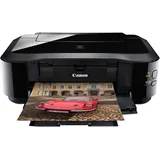
Canon Pixma iP4950
Verified7 reviews

Best printer I've owned – I love this printer. I've had it for years and it's never missed a beat. I used generic ink (AUD$1.50 per cart) prints Cds great. I've printed 1000s of pages and highly recommend it. I want to buy another one new for when mine finally dies but it's discontinued sadly. Happy as can be and will not buy any other brand printer again. Show details

Very tempramental printer like all canon printers – Reliable then all of a sudden leaves you stuck, canon support are useless with little knowledge. I'm personally thinking of going to another company for my printers from now on, canon I understand used to be good but not anymore & I think they are china rubbish. Take my advice & keep shopping. Show details

Uses a lot of ink just to clean the print heads. The quality of printing is very good – The quality of printing is very good.Three stars only because it is so expensive to maintain this printer. It will cost hundreds of dollars a year just to keep it idle. It cleans itself after every printing job, even if you print one page it will go through the cleaning cycle. If you print another page 2 minutes later, it goes through the cycle… Read more
again. My kids print only black and white (uni student assignments). The printer uses all three colour cartridges and black photo cartridge every month just for cleaning without us printing one single colour print. You have to buy them because it will not print black with empty colour cartridge. If you put after market cartridges, it uses them even faster and the cleaning is even more frequent. It somehow knows that you are using non-Canon cartridge (information from the chip?).
Managed to repair my excellent and very economical Pixma IP5000 and sold IP4950.

Great Printer but ink hungry – I love this printer - it does everything I want But Do Not Turn It Off! Every time it is turned back on it chews through the ink. I used 4 full ink cartridges in 3 months and didn't print a single colour page. $88 worth of ink for nothing. It is something to do with its start up processes and probably needs to go through full process every now… Read more
and then but not everyday. I was diligently turning the printer off to reduce standby power consumption. Easy to use, good quality printing, great photos Expensive on ink if turned on regularly

Awful Product – Bought as a replacement for a Canon iP4300. DSE Salesman said iP4950 came with USB cable and only half full ink tanks. Small print on carton says USB cable NOT included. Doesn't say anything about half full ink tanks. Cost of cable in manufacture would be $0.25, if that. Pretty shabby Mr Canon. Jury still out on the ink tanks. Could not… Read more
uninstall iP4300 software as option not on Canon iP4300 install disc. Contacted Canon and uninstall option not available from Canon website either. Printer driver not shown on computer's Add or Remove Programs screen (would Bill Gates or Canon care to answer that one?)
Installed iP4950 SW from disc and not recognised by computer. Possible conflict with uninstallable iP4300 SW? Contacted Canon and after 1 1/2 hrs. and trying 5 plus re installs and multiple workarounds finally got printer recognised by Computer. Next problem printer will only print from cassette. Also cassette has protruding boss in base of cassette tray that fouls paper stack. Paper stack then damaged fitting stack to printer. Have to remember to manually lift print stack over boss. On iP4300 can fit CN22 Customs forms in cassette but iP4950 cassette only goes down to A5. Called Canon for third time and unable to resolve "only printing from cassette". Logged a SW fault with Canon. Eventually found option to select back paper feed in the printer Maintenance Options tab under a Paper Source Setting button. Why not under Quick Set Up, Main or Page Set up only Canon can answer, I assume that they wanted to hide it. Finally able to print a 6 x 4 photograph after three tries. Colour balance badly off with green cast. Canon paper, ink and printer. Unlike iP4300 with edge feed of special size paper iP4950's top entry paper is fed from centre, so have to reset all programs for central print. Now spent about 8hrs. on install. Tried to print scanned copy from Epson V330 scanner and failed, printer NOT recognised. Workaround is to save scanned pics. & docs. to C drive and open and print from an old MGI program. Very loud rattle from printers left hand plastic panel which is loose and bangs on plastic printer body with every traverse of the print head. Prised lower rear edge of cover slightly free and placed postage stamp piece of ~ 6mm soft foam between body and cover, now quiet. (Mr Canon, how on EARTH did this printer get through product assessment and test?) Printed single 6 x 4 pic. from file (after offsetting for the green cast) and printer took about 5 mins. after multiple head cleans. Noted magenta and cyan inks are now 1/3rd down. Total number of prints done approx. 40.
Printer is one of the worst products I have ever bought, considering sending it back to Canon, Japan. I don't want it anymore.
Numerous software and mechanical design faults

A few notes for prospective buyers – Firstly there is no scanner. If you need a scanner, buy something else ! My system has XP sp2, late in the installation process the computer totally crashed with a blue screen of death. After a system reset, the install completed fine. If you want to print a 4 x 6 photo, you will likely want to use the supplied printing software, just be… Read more
aware that not all the commands are out there on the screen, some are tucked away in the menus.
There is no printed manual, it comes on the supplied CD. I was disappointed in the layout of the manual. I wanted to know how to print directly onto a CD, because it's certainly not obvious just by looking at the printer itself.
There was no chapter heading dealing with the subject. I did a search for "CD". This produced some info, but NOT the printing procedure.
Eventually I did a search for "disc" and found the printing procedure, which had been buried away under the heading "Loading Paper". Hey Canon, CD's are not made of paper, why would I look there ?
The supplied software is functional but not very interesting. At this price level Canon should have added something cool for us to play with.
The print quality is excellent, as you would expect from a printer costing $130.
There is no usb cable supplied in the box. If you are just connecting your camera direct to the printer using Pictbridge, then you don't need a usb cable.
A power cable and 5 half-full cartridges are supplied.
The printer footprint is fairly hefty, you will need a good amount of spare space on your desk. high quality output, quiet the manual could have been heaps better, the supplied software is boring

Love it! A great little printer – I bought this printer on a recommendation from a sales person. I was looking for something small - all one in, to replace my current big and bulky HP Laser MFC. While Canon Pixma IP4950 is no laser printer, its almost as good. It is fast, the quality of the print is great, its efficient, and takes very little space. I am really happy with it, so… Read more
far it has proven great for my needs (printing approximately 2-4 colour full A4 pages a day). Small, affordable, good quality prints
ProductReview.com.au has affiliate partnerships. These do not influence our content moderation policies in any way, though ProductReview.com.au may earn commissions for products/services purchased via affiliate links.