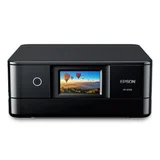
Epson Expression Photo XP-8700
3 reviews
- See all


THREE examples of the same pice of rubbish - I'm thousands of dollars out of pocket – This is the THIRD replacement under warranty of this dreadful piece of rubbish. Whilst the machine is new, you have, of course, spent a small fortune in wasted ink cartridges which is NOT reimbursed. You could devote several hundred hours of your life recovering the ink cost, but who has enough of their life left for this? It simply will not print high gloss 5x7 prints when programmed to do so. It's already been returned once for this to be rectified. The problem seems obvious. The paper pick-up process is just not consistent. years ago I had an Epson R800 - a high end pigment ink printer. That too was subject to inexplicable fails - even with Epson's own, incredibly expensive papers. I'm cutting my losses. NEVER will the name Epson appear on any device in my set-up. Even if the Pope makes it a saint, it will not enter my house. I'm not alone. Chat groups discover the same problems, months after the original gushing announcements of how wonderful these things are. WHY do we have to wait for so long before discovering whether an item is good or bad?

Very disappointed. Heading for the bin – The scanning process is only ok but needed to download another program to do proper quality scanning. It is very very hungry on the expensive ink, with the cartridges being much smaller than my other old Epson which I wish I had kept. Connectivity and printing is very slow. Quality of photo printing is just ok. I would not recommend this product.
Purchased in at Harvey Norman for $299.
- +5

Excellent Printer Until – I had just withdrew from service my IP9000 series Canon and my 8760 Canon . I had recently purchased a 4850 Epson Megatank printer which is excellent, and the connectivity to my computers in 3 rooms and my two smartphones was absolutely first class. In the past, I had Epson printers but always had problems with them and their policy on third party inks kept me from going back to the brand. However, times change, and both my Canons are as useless as you no what with connectivity issues , I finally gave up on Canon and for my second printer I went back again to Epson.
I was using the Epson4850 megatank as a work horse primarily for document printing and scanning, and needed a printer as a stand alone photo printer , so I went with the Epson XP8700.
The printer was easy to set up and used my existing software that I had previously installed on all my devices, the only added thing was to download the printer drivers .
Once I connected the printer to my router everything else went smoothly, the only problem was the initial setup on my computer that sits in the same room as the printer, it was a bit fussy, so I had to use the IP address of the printer and once I put this in it was all plain sailing. I will be using third party inks with this and I found that they work, but one should avoid allowing Epson to update the firmware, because apparently this is where problems are caused, so you need to not allow the printer to update automatically.This option can be turned off so make sure you do it. I am relying on a resellers advice on this , so maybe it doesn't matter, as I recall HP was taken to court over a similar thing, were defeated in court , and had to change their policy on third party inks as it was a restriction of trade.
I am using Canon Platinum Pro in 6X4 and Canon Pro Lustre in an A4. Both papers work fine with the ICC profiles of semi gloss and gloss already in the Epson printer but I tried some third party profiles and the Canon ICC profiles as well to see which was the best and I achieved remarkably similar results regardless of which profile I chose. This is a 6 ink printer, another reason I did not buy a 4 ink megatank , I wanted the added colour spectrum that this printer can print. And then it happened . A software upgrade found it's way onto my machine , but it still worked ok until I tried to print a photo, then noticing considerable banding I ran a nozzle check and nozzles were blocked . Then I was told 2 inks were not recognised, so I took all the inks out and did a intense nozzle clean, it got worse . It needed a clean with a kit. I started the clean and then I was told the scanner could not work, then the printer failed completely . No power, no lights, no nothing, dead in the water. Considering a return under warranty, I wayed it up, I had to pay for postage, then if they deemed it was the non genuine inks that caused the problem I had to pay for the repair and the return freight. Considering all this I dumped the printer and decided to buy a 6 tank eco printer........but that's another story .
Purchased in at Epson Australia for $299.
Extra Information
ProductReview.com.au has affiliate partnerships. These do not influence our content moderation policies in any way, though ProductReview.com.au may earn commissions for products/services purchased via affiliate links.