Best HP Mice

May2025. It's a cheap combo for a reason. Mouse is a bit laggy (yes I did check mouse speed etc in settings and yes the batteries are new new). Okay… Read more
to start with but the keyboard doesn't always respond/sometimes it double types. Keys are very tinny. Like I said - it's okay as a starter especially if you're not a fast typist and not looking for accuracy.

Good mouse, but no longevity – I was initially really impressed with this mouse. Lots of functions and worked really well - for about 6 months. Then the main sensor failed so, no… Read more
more movement. A good, cheap option for gaming, but don’t expect it too last too long under heavy usage.
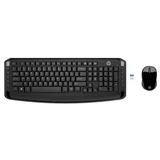
Ok for the price – Finally caved in after working from home on my laptop and bought a monitor and keyboard. The HP keyboard was middle of the range at Officeworks. … Read more
Only $39.95. Works ok. No bad keys. Mouse is fine. Hooked up to my laptop as soon as I put the USB dongle in. The key weight could be a little heavier (feels a bit flimsy) but I guess you get what you pay for. Looks ok.

Looks Better Than It Feels – I was shopping for an external keyboard for my laptop. Even after unboxing it quickly in-store and tapping a few keys, I thought at least the… Read more
keyboard would be OK. It only lasted a day and had to go back. Why? That home key is in the wrong place! Accidentally hitting it more times than not and being sent to the wrong place on a page. The keys themselves are also pretty loud when you're banging away, something I didn't notice in-store. Another reason was the mouse. While I didn't specifically buy it because of the included mouse, the edges are so sharp I could feel it being uncomfortable real quick if I used it. I immediately went back to my original mouse with the intent of keeping just the keyboard. It installs pretty easily though, with no driver issues on windows 10 and basically works from the get go. In the end I returned it and swapped it for something else which I'm much happier with.
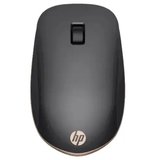
Has too much lag and unresponsive – I hate those finger-pads on laptops so I always use a mouse. This HP mouse has non-response and lag issues, so I have gone back to logitech for… Read more
bluetooth. Recommend DON'T BUY. I wasted my money. As and old and loyal HP calculator user I expected quality. What I got was standard MiC non-quality (MiC=Made in China). I should have paid more attention to the site of manufacture. Again, DON'T BUY!

Mouse worked <50 of the time (new product) – Not sure if this was a one off issue but I switched (from a product I was happy with - see my other review) to this because all my other devices are… Read more
HP [2 laptops, dual monitors, all of which I really like]. Not so with this wireless keyboard (flat profile was too high) and mouse (hello, where are you? oh, you're not working again?) Price was right ($39) and I persisted for 2 wks (changed mouse settings and moved the USB dongle to closest location to me/keyboard/minimal interference and no improvement. At best, mouse worked 50% of the time. The cover for the mouse base was also difficult to remove/put back, perhaps because I'm used to much easier slide mechanisms (sounds petty but I use it al the time store the dongle). Wasn't keen to try the same product again, sorry HP.