Best Mikrotik Modems / Routers

MikroTik CRS305-1G-4S+IN
I really like this switch (with the option to use it as a wired router as well) for it's 10Gb performance, reliability, adaptability, and price. It's… Read more
also silent, small, and can be installed pretty much anywhere.
Like all SFP+ network devices, each port can be used using different connections. You can use DAC cables for in-room and affordable high speed links to NAS systems from your nearby workstation. At the other end, you can use fibre.... (which, with the right modules to go hundreds of metres or even kilometres between devices, completely interference free). Of course, you can even use SFP+ to RJ45 modules too for legacy ethernet connections. They work well, but have drawbacks.
MIX AND MATCH AS NEEDED:
You could put a different type of connection on each SFP+ port of this switch and get 10Gb throughout! Although in my real world tests, if the devices at both ends are fast enough, I get between 8.2-9.12Gb/s on DAC cables, about 9.05-9.3 on multi-mode fibre, and a surprising 8.6-9.22Gb/s through an RJ45 module when shifting large contiguous files. That's consistently above 82% of theoretical threshold. However, a transfer is only as fast as the slowest device in the chain. Please remember that, and sending lots of little files will be much slower than a contiguous block of data, say in a huge video file.
CABLES & MODULES NOT INCLUDED, FLEXIBILITY NEEDS CAREFUL CONSIDERATION:
NOTE: All of the cables and modules listed above are separate purchases. They are not included with this switch. Also, no matter how you use this switch, each approach requires devices at the other end to suit the cabling used. However, 10Gb SFP+ network cards are not much different in price to normal RJ45 10Gb network cards. In fact, they're often cheaper!
For close range connectivity "in room", this switch with some DAC cables offers one of the cheapest and simplest ways to get true 10Gb links throughout.
If going further afield between rooms or even buildings, or in industrial settings, fibre is immune to all RF and electrical interference. Depending on the modules you install, multi-mode fibre modules can get 10Gb over 300, and even 500m, depending on the cable standard. Single mode fibre can reach 80Km or beyond. (Naturally that's more expensive).
You can also install an RJ45 module and connect using standard ethernet cables.. but I try to avoid it as the modules are very expensive, (more than multi-mode fibre ones at least), and they run hot (and as a consequence, have a shorter life span).
WHY DON'T I JUST USE WI-FI?
While mesh-based Wi-Fi systems are on the rise, many places are just not ideally suited to their use, particularly over longer distances, in areas with high amounts of interference, and where obstructions pose a problem. Also, cabled systems are generally more reliable, perform better, offer greater security, and can even be cheaper than some high end mesh network kits.
Interestingly, WiFi 7, the latest and greatest WiFi offering at the time of writing.. well it's highly vaunted "46Gb/s max speeds" is entirely theoretical. With the walls in the house and 15m distance from the router, I get only 4-6Gb/s. With all the other wifi devices around the home, that total bandwidth gets shared... and not always ideally. So performance strays even further from ideal conditions. That wastes more time than you might think, and it's always cumulative when time is money.
BACK TO THIS MIKROTIK CRS305
One of the under-rated features of this switch is the dual power supply ports. If you have two separate power circuits, you can plug a power adaptor into each, and if either goes down, the switch will keep functioning. It's not something you see on consumer grade hardware, even at higher price points. That said, you'll need to buy the second power supply separately, as that isn't included.
I've installed these switches for a variety of clients in about 30 different locations, with some in domestic, commercial and industrial settings over the past 8 years or so. I even use them in my home to link the "shed down the back" to the primary router, and another of these switches at the other end of the property where most people in our home spend their time.
IS THIS REALLY A SWITCH OR A ROUTER?
Mikrotik offers two operating systems for this unit, a switch OS, and a router OS, which you have to install in order to swap over. It's not difficult to do, but it's also not "incredibly intuitive" either. Please read the manual beforehand to avoid frustration.
While both OSes work, I feel the router OS on this hardware isn't the best fit, but "it'll do in a pinch" if you need to. I prefer to keep this as a switch and let more powerful hardware take care of the routing needs. In either case, there's a console port to manage the settings. You can access it through the 1G ethernet port on the device, or remotely access the OS and make adjustments as a managed switch or router as needed once remote access is configured. Honestly, I always wish it had ONE more port..... but then, I'd probably want another one after that. Mikrotik makes an 8 port model, which almost twice the price, but then, you're getting twice the capability and more powerful hardware a little more suited to the RouterOS.
I like Mikrotik for the build quality, it's cheaper than Cisco by a mile, there's a distinct lack of "up selling" network protection plans/subscriptions like Netgear, and Mikrotik hasn't had any major problems relating to questionable data collection/security concerns that TP-Link has suffered from.
What's not to like?
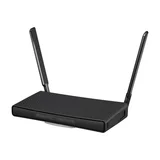
MikroTik hAP ax³
- Frequency BandDual-Band (2.4GHz, 5.0GHz)
- Maximum Wireless Speed1,200 Mbps
Needed a new home router because our new smart hot water service didn’t like the old one. Wow does this thing have some range and give you some WiFi… Read more
coverage. Reaches everywhere in the house and then some. Put in a new solar and battery system on a ground mount system 80m from the house. This router reaches to the inverter with good signal strength. Just to be on the safe side we also opted for their external aerial, I now have WiFi on my 2 acre block, not sure when I will need it but great to have. Highly recommend.