
Blanco BFS60WXFF Questions & Answers

Burner caps required for this model BFS60wxff serial number 110016265
Can I buy spare parts , if so from who and where ?

do i need to remove tiles to remove stove
to remove this stove do i need to remove back flash

One gas burner lights but will not stay lit when I release the knob

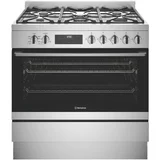
Hi there - I need the control panel diagram for this model bfs60wxff. All markings have rubbed off.

Good afternoon, if you would like to forward your email address to the following email we will be happy to forward the manual to you. The team at Blanco, alexisp@shriro.com.au
Hi - the manual does not have the relevant decals. I already located that online. What I need is a diagram or picture of the temperature dial calibration and the mode selector dial. Thanks
Good afternoon, we have exhausted all avenues to try to assist you , we have checked all warehouses to see if we could send yo a photo of the control panel Unfortunately due to the age of this model we do not have any stock to do this for you. Sorry we are unable to help. The team at Blanco.

Can someone send me a close up picture of the knob with temps for oven please

I wish I could but they wore off in the first week after using the worst stove in history!! I'm moving in 2 days time and I'm relieved to get away from the Blanco lemon. If it helps, the temperature at the six o'clock position of the knob is 200°
Thank you
Hi Barry, we are looking for a unit that might be in our warehouse so that we can send you a photo of the knob, as this is a discontinued line we might not have one but as Jan has advised 200 is at 6 o'clock. The team at Blanco

The temperature setting of the oven is no longer visible could you please send me temperature settings
Did you get an answer on this

Can you please tell me which knob is the temperature control? We’ve moved into a property with this oven and no markings, manual is hopeless and no explanation of how to set temperature or even which knob! Thankyou

Can I turn rangehood light on without the fan

The oven door no longer goes all the way open to get full access .

I bought the house with stove and no manual. The power went off and now oven won't work til I reset the clock, trying to do it but its not working. Can someone please tell me how to reset the clock. Thanks a lot! Felicity

There are 6 buttons under the clock. Number them from your left to right as 1-6. Press the two most left buttons (1 and 2) at the same time and hold them down while you tap the - or + button (buttons 5 and 6) to set the time on the clock. Hope this helps.

Is it possible to get the front panel control etchings for my Blanco oven model BFS60WXFF All the information has disappeared with cleaning, I realise this model is discontinued but hope the etchings are still available. Thanks for your help.

Ignitor not working on stove top. What can I do to remedy problem
If all the igniters are not working, and the power has been off, it is probably because the igniters don't work unless the clock has been reset. However, my stove has the problem that two igniters work all of the time and two work intermittently. This makes me suspect there is a problem with the wiring. But my stove repairer said I should not put any more money into this stove, so I bought a stove lighter instead. It works well.

Have a Blanco BFS60WXFF gas cooktop/electric oven, power cut out to the appliance. Power at the socket ok but dead to the oven. Any ideas? thanks. Pat
Oven won't go on if you don't set the clock. It always goes off in a power cut. So you will need to reset it.

Could you please send me the etchings on the knobs for the oven, temp settings and elements. My have ALL come off through wiping the front panel with water. Thanks

Mine all came off too. Now I guess what things are.

Hi Catie Bortolot. Have you received the edgings on the temperature setting knobs yet?. I need them too.
Get an answer from our members



Extra Information
ProductReview.com.au has affiliate partnerships. These do not influence our content moderation policies in any way, though ProductReview.com.au may earn commissions for products/services purchased via affiliate links.