Best Logitech Mice

- See all


Fantastic mouse, but left button died after two years – I was ecstatic to find a great mouse for my iPad… it changed the ipad into a “full laptop replacement” for me. I would rate the mouse itself as… Read more
5-star, but I knocked it down to 4-star as it wore out faster than I hoped.
It worked brilliantly for two years. Then the left button started to feel “heavy”… a little harder to push, and then many clicks started to be missed. And it got progressively worse over about two weeks. Other posts indicate that the contacts start to die, or the micro-button itself starts to seize up. Not sure which.
Admittedly I did use it a lot, probably 5 hours a day, so about 3,000 hours. But I have never had a mouse die like this on me before.
I still bought a replacement one (M350s) and I hope this one lasts longer.

- See all


Left click button double clicks while selecting text or drag and drop. Its a failure in click board and a very common issue. I only occasionally used… Read more
this mouse and it failed me shortly after the one year warranty window closed. Logi did not do offer a replacement. Apart from this issue, it is over priced for what it offers.

- See all


Comfortable keyboard, That's all about it. The Worst Keyboard I've ever used. The keyboard disconnects while using and trying to connect to other PCs which doesn't exist and really frustrating. Would you buy this product again? Not for a $1 Show details

- See all


I purchased the G502X (black mouse cable/non-wireless) Jan 2026 and have been quite happy with it. I use it as my main mouse at home almost daily… Read more
and have not noticed any issues with it as of Sep 2026
- It's lightweight but does not feel as if it will break easily.
- It fits well and is comfortable in my above average hand size. Right handed mouse, no good for left handers.
- The scroll wheel feels decent quality and is responsive. The button allowing free wheel (fast) scrolling or normal step scrolling is very useful.
- The 2 main buttons are fine, the 5 side buttons are ok to reach although some are a little awkward to press.
- Collects a bit of dirt in the grooves on top of the mouse but nothing excessive.
- It performs smoothly on both a mouse mat and a directly on a standing desk surface (black with fine particle texture).
- Corded. Never need to worry about charging, or the battery barely lasting a day hours in 2 years time.
- I use it on Linux, mostly for general use with some non-fast paced gaming. All features and buttons work on Linux however if you want to configure them you will need to install a tool like Piper.
As with most Logitech products, their "GHub" software to configure their products (for Windows users) is completely unreliable, poor quality and frustrating. If you can avoid installing it and use some other tool for config I strongly suggest you do. For many users you just don't need the manufacturer software for products like mice and keyboards these days.

- See all


Just what one needs for my new security systems. The Logitech M720 Triathlon works well with the Swann consoles, computer, laptop, but is NOT… Read more
compatible with Sony Bravia TVs, any of them, only PARTIALLY works on those.
That said, this Logitech M720 Triathlon mouse has excellent response time and works exceptionally well for the consoles, computer and laptop. The mouse has ONE and only ONE physical USB connector, other devices must be connected via Bluetooth.
The Logitech M720 Triathlon can control up to three devices, making it a handy proposition if you are not using them for smart TVs, especially SONY TVs.
One is however at a loss why Logitech call it a "Triathlon" when it only comes with one physical wireless USB connector? So be very aware of this when buying mice expecting to use in two devices. Other multi use USB wireless mice come with TWO USB connectors you plug in to devices, and with SWANN systems having no Bluetooth connectivity, one has to now go out and buy another one of these.
Otherwise, HIGHLY RECOMMENDED.

It is a good mouse, however i have had issues after just 1.5 year with the scroll wheel. Logitech support was not very helpful and very slow to answer. To get a replacment you will have to go through multiple people and E-mails its very frustrating. Show details

I've had this mouse (Logitch M325) for several years and it is excellent. No problems at all in any respect. It is excellent ergonomically, light and easy to grip. I bought a new Satechi for my macbook but it is a rubbish mouse in comparison.

MX Ergo is fantastic – For people who have limited space / foot print on their desk / workspace the MX Ergo is a game changer. It takes a little bit of getting use to not… Read more
needing to move your hand, the MX Ergo is controlled by your thumb and finger which means that there is less stress on your wrist, there is no sliding it in any direction to find you hit paperwork or run off the mouse pad or that you have a glass top desk. the MX Ergo will work on any surface including sitting on your all your paperwork.

It doesn't come with a dongle to connect it, apparently a cost saving measure. To bad if you want to connect it with any exotic equipment. Not suitable. Show details

Logitech G502
Disappointing - OK mouse let down by flawed middle button – It's a reasonable upgrade from its predecessor but has a couple of design flaws. First, the mouse wheel doesn't have a lot of grip - OK for the most… Read more
part but on very dry days it could do with slightly more grip. Secondly, the mouse wheel 'left' side button doesn't have as much surface area as the right side mouse wheel button. This is because the regular left mouse button (1) is slightly higher than the regular right mouse button (2). So, your left index finger (1 - left mouse click) is positioned higher than your middle finger (2 - right mouse click). Trying to engage the left side mouse wheel button usually results in the actual mouse wheel button (button 3) engaging. This is extremely annoying in the heat of an action game, and consequently isn't useful - probably no big deal for something like an RTS or RPG, but in a fast paced action game it's really bad.
Otherwise software is good and response times & accuracy seem pretty good too.

Unreliable and Disappointing – At first the mouse worked well. However, after about four months, it stopped working reliably. I tried reinstalling and researched advice without success. I don't recommend this mouse if you need reliable office equipment. Show details

- See all


Excellent mouse for 2 years office use, then the left button started missing clicks requiring harder presses. The mouse wheel is fantastic but i… Read more
hardly use it and it doesn't scroll left and right in Excel.
Battery life is excellent. Ergonomics is perfect for my smaller hands. Tracking is above average but not good on reflective glossy surfaces.
There are 4 extra buttons which need the new Logi Options+ software. The software is unstable and keeps failing requiring manual termination and restarting so the buttons work again. It also needs frequent updates so i don't like it. Going back to simpler Logitech and Microsoft mice.
I also use it with the rather expensive MX Keys keyboard which i love but is let down by this software.

Competitively priced among mice offering similar qualities and capabilities – The Logitech G PRO X Superlight 2 is a standout gaming mouse renowned for its featherweight design and exceptional performance. Weighing just 58… Read more
grams, it offers swift movements and precise aiming, ideal for competitive gamers. Its sleek, ambidextrous design ensures comfort, while the wireless connectivity delivers lag-free responsiveness. However, its premium price and lack of customizable weights might deter some users. Overall, it's a top choice for those prioritizing precision and agility in gaming.

This was a "quiet" keyboard for about 2 months. Then the space bar started making a weird click / screech sound like it needed a bit of oil or something. Show details

After 18 months of use it started giving me problems. Battery wouldn't take a full charge, only charge to about 55%. Also when using the scroll wheel… Read more
the mouse "crash"and would be completely unresonsive for 2-5 seconds. Unfortunatery this product only has 12 months warranty. But for this price tag I was expecting better support. Not happy.

Terrible. Unreliable keyboard – I bought this because my key board on my Toshiba laptop had stopped working. At first I thought it was great but a few months in.... today it typed… Read more
TW when I typed T. Then it did it with other characters. When I couldn't deal with it anymore I went to my online keyboard - tedious but it works.
Then i tried this keyboard again and it was fine! So with a sigh of relief I forgave it. BUT JUST NOW IT STARTED TO TYPE GREEK ALPAHBET LETTERS. ITS BEYOND MY UNDERSTANDING ! Anyway after lock down its going back to Officeworks. What a disaster.

Buttons too sensitive – I just bought this mouse, and unfortunately have to return it straight away because it is borderline unusable. Pros: * Mouse glides along my desk… Read more
very smoothly * Works for both left hand and right hand * Cable is long, light and flexible
Cons: * Left & right buttons are so sensitive that the weight of my fingers alone clicks them. I constantly click the buttons by accident because of this. This means I need to hold my fingers up in the air whenever I am not clicking, which is extremely un-ergonomic! * The lighting is glary and distracting * The middle button (scroll wheel) requires a lot of force to press
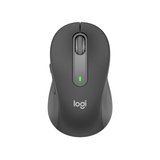
For months I have been trying to figure out what the issues were when using this mouse. Trying to fix things, adjust setups etc. Then it dawned on… Read more
me, maybe it is the mouse. Mine is fecal matter, my wife's one works fine, I have never herd her complain (hence the 2 stars) otherwise it would be just me leaving 1. Sometimes the mouse wont work when it is in use from the other side of the keyboard (via the bolt), forget 10 meters. I would not recommend this product ever, chances are you could be Okay, but why risk it.

Poor performance, avoid at all costs – Bought it for my wife. She nearly threw it out. So I gave her my mouse and started using it. So after trying it in all 3 USB ports, I found one that… Read more
works...well, when it wants to. It works intermittently, stalling occasionally then stops completely. Turn it off, then on and it may work. Uninstall it and reinstall it and it's the same.
my MX master 2s is still working after 6 years of daily use.