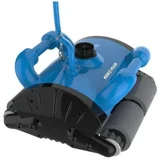

Maytronics DB2 Questions & Answers
Verified
My Maytronics DB2 has worked perfectly for 8 years, but recently has begun doing weird stuff, going back and forth for a couple of minutes, before stopping altogether. I restart it once or twice, and if I’m lucky it will then complete a whole cleaning cycle. As per handbook, I checked for blockages to the tracks and the impeller, but all was fine. I turned it off at the power source, left it off then turned it back on again - same result. I look after it, don’t leave it in the pool overnight etc, so any advice welcomed.

Hi Mark,
Thank you for reaching out regarding your Dolphin DB2. Please contact us on 1300 693 657 option 2. We will run through some troubleshooting and if required, provide you details for your nearest repair agent.

I have a DB2 which isn't Bluetooth compatible. A visitor pressed the Bluetooth button and now the unit is stuck in search mode and won't turn on.
Hey it switched off after a full day. So all good again.

I have the DB2. I have been using for about 1 month without problems, however, the last 3 or 4 times it keeps getting stuck on our seating area which is down one end of the pool. It then just stays there.
Hi Kerry, Thank you for providing feedback of your Dolphin DB2. Our Dolphin robots are not programmed to clean steps, benches, and tanning ledges. Our robots need a minimum depth of 31-41 inches to function properly, if the water level covering the robot is less than this, the Dolphin will shut down as a failsafe.
The Dolphin will only be able to clean the stairs if it has room to stand on them entirely and if the water level is deep enough.
We recommend brushing dirt on the stairs onto the bottom of the pool, for the robot to be able to clean the debris.
Please contact our customer care team on 1300 693 657 option 2. Please have your robot serial number available.

what is the difference between a S200 and a DB2
Hi Don. Thank you for reaching out. With regard to functionality and build, the Dolphin S200 and the Dolphin DB2 are very similar. These models are distributed differently and as a result, the place of purchase varies as well as their colour and their cable length.
Please feel free to contact our Customer Care Team on 1300 693 657 option 2 for further information.
what is the difference between the S200 and the DB2
Hi Don. Thank you for reaching out. With regard to functionality and build, the Dolphin S200 and the Dolphin DB2 are very similar. These models are distributed differently and as a result, the place of purchase varies as well as their colour and their cable length.
Please feel free to contact our Customer Care Team on 1300 693 657 option 2 for further information.
does the cleaner have to be pulled out of the pool after cleaning cycle is over
Hi Don. Thank you for reaching out. If your have scheduled the weekly timer feature of your Dolphin DB2, it is fine to leave the robot in the pool during this period. If, however, the Dolphin will not be used for a day or more, it is recommended to remove the robot from the pool, empty the filter basket and rinse it down in fresh water prior to storing it away.
Please feel free to contact our Customer Care Team on 1300 693 657 option 2 for further guidance.

Is it ok to store the db2 in the pool when not in use? Our pool guy reckons it keeps all the seals and brushes moist so they don’t dry out and go brittle

do not keep in the water when not in use, if not the water will seep into the electronics over time
Hi Tristram, thank you for your enquiry regarding your Dolphin DB2. Although it is safe to leave your Dolphin cleaner in the water when not in use, we do not recommend leaving your Dolphin in the pool for extended periods.
We recommend taking your Dolphin out after each use to empty and clean the filter(s). Then store it in a dry place in a shady area out of the weather.
We also recommend rinsing your Dolphin robotic pool cleaner with clear water regularly to remove any excess of residual pool water that may contain chemicals.
For Dolphin’s with a weekly timer, the robot can stay in the pool for a week, you will still need to clean the filter(s) at the end of the weekly cycle.
Take care to remove the Dolphin when adding chemicals to the pool until the proper chlorine, pH and salinity balances are obtained.
If there is anything further we can do to assist, please contact our friendly customer care team on 1300 693 657 option 2.
Many thanks and have a great day!

Hello I have a DB2 got it feb 22 run it most days but not working today no lights are working on the power box filters are clean any suggestions on what could be wrong with this machine please with thanks Rhonda
I had no end of trouble with mine,, not sure what suburb you are from but theire is a great repair place in Chelsea Vic, I was told not to leave the db2 in the pool all the time as it will malfunction. sounds like you need another controller,,, mine went as well
Hi Rhonda, Thank you for your enquiry regarding the Dolphin DB2. Please kindly call our customer care team on 1300 693 657 option 2. Please have your serial number available when calling and we can go through more indepth troubleshooting with you.
Many thanks and have a great day!
Hi Norm, Although it is safe to leave your Dolphin cleaner in the water when not in use, we do not recommend leaving your Dolphin in the pool for extended periods. We recommend taking your Dolphin out of the pool after each use to empty and rinse the filters and to rinse off any excess chemicals.
Ideally keep your Dolphin out of the pool and stored away when not in use. If your Dolphin has a weekly scheduler, you can keep it in your pool for a week, but you will need to make sure the filter is cleaned regularly.
Take care to remove the Dolphin when adding chemicals to the pool until the proper chlorine, pH and salinity balances are obtained.
If you require any further assistance, please contact our customer care team on 1300 693 657 option 2.
Many thanks and have a great day!

Hi, does the DB2 connect to Bluetooth? The power supply suggests it does but having read a review above, I suspect the pool company may have sold me a ‘badge with not much under the bonnet’. I’m still learning about pools and equipment and I’ve only used the DB2 a couple of times. So far so good but I’d like to be able manually control the robot if I need to from time to time
Thanks Steven

Sorry, I can’t answer your question as I always just put it in when it needs a clean and push the full cycle button on the unit. I don’t need any other functions and it does a brilliant job!! :o)
Hi Steven. The Dolphin DB2 is not a Bluetooth or smartphone application compatible model. While it does have the option to set a weekly timer from the power supply directly, it does not have the capability to set this timer with the use of the My Dolphin smartphone application or to access any other features. This particular robot shares a Bluetooth compatible power supply that is compatible with smartphone connectivity for other Dolphin models.
Thanks for confirming. Outside of the App, if I need the robot to focus on a particular ‘dirtier’ section of the pool, is there a Maytronics remote control that can be purchased to enable manual control?
Hello Steven. The Dolphin DB2 is not compatible with a remote control as it is not Bluetooth compatible. It is recommended to try starting the Dolphin from a different location or, from the middle of the length of the pool as this allows for best mapping. Please do not hesitate to contact our Customer Care Team on 1300 693 657 option 2 for further information.

I purchased my DB2 maytronic dolphin pool cleaner yesterday. After an hour it just stopped. I removed it from the water and placed it back in, then reran it. This time it ran for 2 hours. I thought the single cycle ran for 2and a half hours. Despite this, I was amazed at the amount of dust it collected in the filter. Is this normal…. The stopping in the middle of a cycle. Cheers Judy
Hello Judy. The Dolphin DB2 has a two hour cleaning cycle and once this time is complete, the robot will stop. Should the robot turn off prematurely, it is recommended to check the impeller for any debris to ensure that no obstruction is causing early shut down. Please feel free to contact our Customer Care Team on 1300 693 657 option 2 for further assistance.
Thanks for getting back to me. Now that I realise the robot runs for 2 hours…. It has as many have said … changed my life. I use it once a week and am still amazed at what the robot picks up…. Visitors are always commenting on how beautiful and clear my pool is. Thank you x
Hello Judy. We are so glad to hear that the Dolphin is doing a great job in keeping the pool clean and clear! Have a great day.
Get an answer from our members and Maytronics representatives




Extra Information


ProductReview.com.au has affiliate partnerships. These do not influence our content moderation policies in any way, though ProductReview.com.au may earn commissions for products/services purchased via affiliate links.