Best Epson Printers

Epson EcoTank ET-4750
- Price (RRP) $649
- Printer TypeInkjet
- Multifunction FeaturesCopier, Fax and Scanner
- Two-sided PrintingYes
Use to love Epson. Had a dot printer years ago. This one worked great when we first bought it but after that it was one big fail. We only print every… Read more
now and then. When we went to use it months later the heads were blocked. After troubleshooting online it said it was a common problem and the ink tank printers needed to be used constantly to avoid blockages. I ran it through a couple of cleans but no improvement. It recommended as a last resort to run it through a deep clean. The deep clean uses a lot of ink. The ink bottles may last a long time but they are very expensive to replace when the time comes.

Epson Expression ET-2700
- Price (RRP) $545
- Printer TypeInkjet
- Multifunction FeaturesCopier and Scanner
Worst printer I have ever owned – Worst printer I have ever owned. I have to clean the heads multiple times just to print a clear page. This seems to be a known issue ... don't buy one.

Epson Expression Home XP-4105
- Price (RRP) $79
- Printer TypeInkjet
- Multifunction FeaturesCopier and Scanner
- Two-sided PrintingYes
- See all


I’ve change the ink cartridges twice and it’s skipping lines like every print. Easy to use but print quality is rubbish. Ink cartridges don’t last… Read more
long and the overall experience is bad. I’m going to throw this out and get a much more reliable printer.

Epson Workforce Pro WF-3720/WF-3725/WF-3730
- Price (RRP) $219
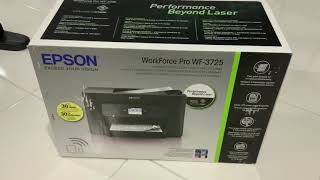
- See all


The printer continues to display a low ink level warning even after a brand-new genuine cartridge has been installed. The issue persists despite… Read more
replacing the cartridge with a new Epson cartridge.
The printer has had very little use and would be lucky to have printed more than 30 pages in total during its life. Unfortunately, despite following the recommended troubleshooting steps, I have not received a satisfactory resolution or support from Epson.

Epson EcoTank Photo ET-8500
- Price (RRP) $999
- Printer TypeInkjet
- Multifunction FeaturesCopier and Scanner
- Two-sided PrintingYes
Had numerous printers over the years, absolutely no problems at all with this printer, software is very easy to use, updates load all the time with no fuss.

Epson EcoTank ET-2811
- Price (RRP) $399
- Printer TypeInkjet
- Multifunction FeaturesCopier and Scanner
- Two-sided PrintingNo
- See all


I bought this printer from Officeworks because of the advertised ink tank feature. Unfortunately, printer seems cheaply made, and it broke just… Read more
before the warranty expired. After an endless back-and-forth with the Epson repair team, it was finally fixed. However, it broke again soon after, this time due to one of the poorly made internal plastic components, and now it’s out of warranty. Given the price I paid for this unit, I find it highly disappointing. We haven't even used half of the initial tank capacity, and this printer is to go to the bin. I wish I had spent about $100 extra to purchase a more robust printer from another brand.

Epson EcoTank Pro ET-5150
- Price (RRP) $669
- Printer TypeInkjet
- Multifunction FeaturesCopier, Fax and Scanner
- Two-sided PrintingYes
Good printer, economical printing. I really like the InkTank bottles, and they are easy and mess free. Had the printer for over 1 year without any… Read more
problems. My only issue is the awkward access to the output tray for finished printing. It is tricky to remove your printing unless you can access it from the rear. We bought this printer for the document feeder and duplex printing. Only does single sided scanning though.The ink for all Pro series InkTank printers is pigment ink, so it doesn't fade or run like dye inks do. We had a Brother before, and had to discard it when the non user replaceable waste ink pad filled up. The Epson has a replaceable waste ink tank that only costs about $15. The ink is really good value as well. Really happy with this printer and would recommend for home office.

Epson EcoTank ET-2750
- Price (RRP) $499
- Printer TypeInkjet
- Multifunction FeaturesCopier and Scanner
- Two-sided PrintingYes
Very spasmodic with its connection to WiFi and does not have option for cable. Too frustrating when you just want to print and run. Show details

Epson WorkForce Pro WF-4830
- Price (RRP) $269
- Printer TypeInkjet
- Multifunction FeaturesCopier, Fax and Scanner
- Two-sided PrintingYes
About to throw it out. A piece of rubbish. I print only in black and white, but it uses all the colour cartridges up?! and Wi-Fi connection is always… Read more
dropping out, even though the router is right next to it! I have to reconnect with every print job! even if they are seconds apart. DO NOT BUY... Very frustrating.

Epson EcoTank ET-2810
- Price (RRP) $399
- Printer TypeInkjet
- Multifunction FeaturesCopier and Scanner
- Two-sided PrintingNo

- See all


This Printer/Scanner is so unreliable that I have to contact Epson Customer Service regularly to get it to connect to my Wifi or to update. It… Read more
continually disconnects. I've had several Printer/Scanners before and never had so many connection problems. It's very disappointing, and Epson appears to be ignoring possible solutions. Also, their software is complicated and not customer-friendly. Otherwise, the machine's large ink capacity is a real bonus. DO5918For a Printer costing $359, I'd expect more reliability!

Epson EcoTank ET-2710
- Price (RRP) $399
- Printer TypeInkjet
- Multifunction FeaturesCopier and Scanner
- Two-sided PrintingNo
Don't waste your money – Bought this one year ago to save money by not having to pay for ink cartridges You buy ink and fill up four containers on the printer The quality of… Read more
printing compared to a printer with an ink cartridge is quite frankly crap.
I have had numerous communication errors with this printer requiring me for hours to delete the driver and reinstall it, and call Epson for support
The biggest negative for me is the printer has no heads up display- no LCD window. Just some dinosaur era buttons. It makes spurts and noises and you have no bloody idea what it's doing.
The number of times I have got an error on my laptop and then feel like killing myself due to hours spent trying to work out what's wrong with the stupid freaking printer is really absurd.
Do not get this printer. After a while you have to do an aggressive printer rest and cleaning of the nozzles that burns through a crap run of your ink, negating any savings you thought you were making by going cartridge free. I still have it and after 1 month of no use I started it up again and it won't even print a single page- it's like the page is 1/10 of the darkness and there are lines missing throughout the entire page. So here I am back again trying to diagnose this nasty bloody printer. Waste of time and money.hate it.

Epson WorkForce WF-2830
- Price (RRP) $129
- Printer TypeInkjet
- Multifunction FeaturesCopier, Fax and Scanner
- Two-sided PrintingYes
Absolute disaster from day one. Spent hours fiddling with settings, reconfiguring, reading google help, cleaning the print heads etc, etc and the print quality was abominable if it printed at all. Do not buy!!! Show details

Epson WorkForce Pro WF-3825
- Printer TypeInkjet
- Multifunction FeaturesCopier, Fax and Scanner
- Two-sided PrintingYes
Was ok at the start....Nothing but issues from connectivity, will not recognise correct paper size. Print quality dropped after first few months with printer head alignment issues. Cheap in price...CHEAP IN QUALITY!!! Show details

Epson EcoTank ET-1110
- Price (RRP) $299
- Printer TypeInkjet
- Two-sided PrintingNo
Don't Waste Your Money – For $268.47 from Big Red Tech through Kogan I was expecting a few bells and whistles. I should have checked the specs far more thoroughly. The print… Read more
quality is about the same as my last $35 printer. There are no features, except printing, not even Wi Fi! The single most absurd complaint is the USB connection, apart from being the ONLY way to connect the printer, it uses the most obscure USB socket and it is NOT included with printer. Don't waste your money, the extra ink storage is not worth it.

Epson EcoTank Pro ET-16600
- Price (RRP) $1,749
- Printer TypeInkjet
- Multifunction FeaturesCopier, Fax and Scanner
- Two-sided PrintingYes
Constantly have problems with it, is is a poor quality build piece of rubbish Show details

Epson EcoTank Pro ET-5170
- Price (RRP) $649
- Printer TypeInkjet
- Multifunction FeaturesCopier and Scanner
- Two-sided PrintingYes
I can’t believe this product is still on the market – This is my second Epson printer. Had an Epson about 10 years ago and replaced it with a HP. When the ECO tanks came out I purchased an HP that worked… Read more
perfectly, after a few years I gave it to my grandson and it still works. I purchased the Epson ET-5170 as a replacement on 9/28/22, first problem occurred 3/20/23, the printer started crunching up the tray paper then stopped printing. I lost 3 days of work working with Epson IT to straighten it out. Periodically it still jammed the paper, but it was working. 3 days ago it started again and I have been on the phone with Epson IT, losing 3 more days of work. I am told that it is a Hardware issue, after collecting several reference numbers and sending my receipt of purchase, registration of warranty and pictures of the printer inside and out, and serial number. I was told that I can get a replacement that will take 5-10 business days and I must return the old one within 7 days or get charged another $599 on my credit card. Epson is the only printer that I have purchased that did not last 2 yrs. I am deeply disappointed with the reliability and consistency of the Epson Printer

Epson Expression Home XP-3100
- Price (RRP) $89
- Printer TypeInkjet
- Multifunction FeaturesCopier and Scanner
- Two-sided PrintingYes
Worst investment ever if you need to print significant amount of pages – Black ink needs replacing every 100 pages, and its cost is 1/3 of the printer itself. The printer low cost is a hook that should not misguide innocent buyers like myself. This printer is a no-go if you need to print a significant amount of pages.

Epson Expression Home XP-2100
- Price (RRP) $79
- Printer TypeInkjet
- Multifunction FeaturesCopier and Scanner
- See all


Was helping an old couple get their printer working. Is such rubbish. Poor english, required two apps to install to my iPhone for setup. Needed… Read more
chatGpt to tell me the correct buttons to press to enable connection to an AP, as neither the printed instructions nor Epson’s infuriating online guide was correct.

Epson WorkForce Pro WF-4835
- Price (RRP) $269
- Printer TypeInkjet
- Multifunction FeaturesCopier, Fax and Scanner
- Two-sided PrintingYes
bought from binglee last month. once i figured out the driver thingy it's easy to use :) Show details

Epson Expression ET-2720
- Price (RRP) $479
- Printer TypeInkjet
- Multifunction FeaturesCopier and Scanner
- Two-sided PrintingNo
Failed after 30 months – 2720 great to start with, then ink stopped flowing to cartridges at print head. Took it to be repaired they sucked ink in to carts' and all was fine… Read more
until they emptied again. I didn't even use 25% of the ink that came with it. It's now at the local tip.

Epson EcoTank Expression ET-2500
- Price (RRP) $449
- Printer TypeInkjet
- Multifunction FeaturesCopier and Scanner
I can't believe I threw away $500 on this useless printer – Purchased when they were first released I had high hopes for this printer but those hopes were very short lived. The set-up process was easy in every… Read more
respect but the fun stopped there. I purchased this model for photo printing primarily & quickly realised that the image quality was not great & it was very slow to print. Within a few weeks the images had developed lines throughout & no amount of cleaning cycles would fix it. I contacted Epson & was told to do all the things I had already done to no effect so I took Epsons advice & repeated the process with no success until the eventually I gave up. I spoke to several printer service people who invariably told me it was not fixable & that I might as well bin it. But it cost me so much money I just had to find a way to fix it but never could & it has sat on my desk ever since gathering dust. I'm not a wealthy man & I get upset whenever I think of the money Iost to Epsom over this very expensive and unusable printer. I cannot recommend any Epsom product after my experience with firstly their printer & secondly their dismissive attitude to my problem. As stated above I'm not a wealthy person & saved money for a long time for what was supposed to be a quality product. Unfortunately it seems I chose very poorly and lost my money to this utterly useless printer. Never again Epson.

Epson EcoTank ET-1810
- Price (RRP) $299
- Printer TypeInkjet
- Multifunction FeaturesCopier, Fax and Scanner
- Two-sided PrintingYes
- See all


This is the worst air printer ever Hey the ink will last forever! Because it's never available endless network issues I've given it a fixed Ip a… Read more
dedicated wireless 2.4 link But it's never there. The diagnostics are all good everything is done right but it's never available. It just doesn't work Every time i print or attempt to I have to reset everything then it works for a few jobs and goes back into hiding

Epson WorkForce WF-7845
- Printer TypeInkjet
- Multifunction FeaturesCopier, Fax and Scanner
- Two-sided PrintingYes
Best printer and scanner that I have ever owned over the last 10 years and it's still going when other fail outside of warranty Show details

Epson Expression Premium XP-6100
- Price (RRP) $179
- Printer TypeInkjet
- Multifunction FeaturesCopier, Fax and Scanner
- Two-sided PrintingYes
Has been a terrible printer that always faulters. Contacted Epson support today for assistance & they were useless & clearly didn't care. What a waste of money. AVOID EPSON LIKE THE PLAGUE! Show details

Epson Expression Photo XP-970
- Price (RRP) $399
- Printer TypeInkjet
- Multifunction FeaturesScanner
- Two-sided PrintingYes
Crap ink wasting ripp off – Used all colour ink . With just printing black and white it's a ripp off ink wasting machine Show details

Epson EcoTank ET-4850
- Price (RRP) $679
- Printer TypeInkjet
- Multifunction FeaturesCopier, Fax and Scanner
- Two-sided PrintingYes
- See all


I had previously had an older Epson printer for years which was excellent except expensive for ink costs, which is why we bought this model because… Read more
of the cheaper ink running costs and there is a reason the ink is cheaper because the print quality is significantly worse than a model that was at least 5 years old! Colours are washed out and lack vibrancy. The worst problem however is that it noew refuses to connect via wi-fi including the wi-fi direct. I did software updates etc and it continued with the same problems. Stay well clear of this model. I agree with the other assessments here it is by far the worst printer I have ever owned or used in multiple businesses over the years. I will never buy Epson rubbish again!

Epson WorkForce WF-2810
- Price (RRP) $99
- Printer TypeInkjet
- Multifunction FeaturesCopier, Fax and Scanner
- Two-sided PrintingYes
Utter rubbish – After a couple of years of one problem after another, despite very little use, and spending a fortune on the very-expensive-but-don't-last-very-long… Read more
cartridges, I have had enough. I would like to throw it against a brick wall. I will never, ever buy an Epson printer again.

Epson Expression Home XP-4200
- Printer TypeInkjet
- Multifunction FeaturesCopier and Scanner
- Two-sided PrintingYes
Lasted about a week before I put a hammer through it (it was more satisfying than trying to return it), This printer requires 6 different pieces of… Read more
software to operate. The final stand was when I scanned a document, then when I tried to print it said "printer not connected", alot of trouble shooting later and reinstalling everything from scratch I printed the test page... perfect, worked great.... then I tried to print a document and got the "printer not connected" error again and the printer was no longer detectable from it's own software to print (but as before I could still scan from it).... the hardware is probably fine, the software is something dreamt up in the underworld to aggrivate people.

Epson WF-2860
- Price (RRP) $199
- Printer TypeInkjet
- Multifunction FeaturesCopier, Fax and Scanner
- Two-sided PrintingYes
Not worth the ink it costs to print – I've had this printer for a couple of years now. Little use. Didn't have too many issues until today. Replaced 3 x Epson 202 Colour STD Capacity… Read more
Cartridges 21/2/24 - All Good. Replaced Black Cartridge 1 week later, 28/2/24 again with an Epson 202 Black STD Capacity Cartridge. Problem, no Black print. Performed Print Nozzlehead Check which showed all 3 Colours printing just No Black. Ran the print head clean as suggested on the screen, still No Black. Did this 4 times in all without any success, can't do any more as ALL Print Cartridges are now Empty! Biggest waste of money ever - AUD$82.76 in total ($20.69 each from Officeworks). Epson customer service suggests I take the printer to a service technician (out of warranty), possibly a printhead nozzle issue. That's not going to happen unless Epson refund me the cost of the new Inks just purchased, it'll be thrown out before I spend another cent on it. FYI. Will not print Black if any of the other 3 colour cartridges are out.

Epson Expression Home XP-2105
- Price (RRP) $79
- Printer TypeInkjet
- Multifunction FeaturesCopier and Scanner
- Two-sided PrintingNo
The rubbish bin is the best place for this printer – Absolute garbage printer. Never connected properly, printed test pages that used half the ink cartridges. Dont buy. Three it in the bin after a year of frustration.
Just to Update my previous post: Epson has proved itself, After the replacement in 2023 I have not… Read more