Best Modems / Routers

Ryoko Pro
- Price (RRP) $233
- Maximum Wireless Speed150 Mbps
- See all


Awesome product! Simple installation! A true gift to our world. I'm grateful and I'm offering my thanks to all hands involved in this product. Peace! Show details

ASUS RT-AC68U
- Price (RRP) $229
- Frequency BandDual-Band (2.4GHz, 5.0GHz)
- Maximum Wireless Speed1,300 Mbps
The Best – Have a few around the house and is a fantastic product. 10 years and counting and they just keep on ticking. User interface can be a bit… Read more
overwhelming for a newbie but you'll be right. AiMesh works great. NBN FTTP no dramas and Wi-Fi multiple devices just fine. Good app for parental control.

TP-Link AC1200 Archer VR400
- Frequency BandDual-Band (2.4GHz, 5.0GHz)
- Maximum Wireless Speed867 Mbps
Very helpful technical support team. TINECIA Nong. She helped me out with the internet connection to my modem. Show details

TP-Link AC2100 Archer VR2100
- Price (RRP) $249
- Frequency BandDual-Band (2.4GHz, 5.0GHz)
- Maximum Wireless Speed1,733 Mbps
Overall the product works well, though I have had intermittent connection issues. However, after trying all the troubleshooting I could on my own,… Read more
after 20 mins with Lauren over the phone everything worked perfectly and I've had no issues since. Lauren was patient and effective even through difficulties on my end.

TP-Link AC1600 Archer VR600 / VR600v
- Price (RRP) $199 to $209
- Frequency BandDual-Band (2.4GHz, 5.0GHz)
- Maximum Wireless Speed1,300 Mbps
Carlie H, went above and beyond to help me resolve my internet issue. I would highly recommend reaching out to get their help with any issues. She was polite and respectful considering I’m not fluid with anything to do with the router. Thank you

TP-Link AC1200 Archer VR300
- Frequency BandDual-Band (2.4GHz, 5.0GHz)
- Maximum Wireless Speed867 Mbps
Great product. I was having issues connecting it to my new NBN service and so I rang TP link support and got thinks working real fast. I spoke with a… Read more
woman named Hely and she was extremely helpful and talked me through the steps with great clarity. Highly recommend!

TP-Link AX3000 Deco X50
- Frequency BandDual-Band (2.4GHz, 5.0GHz)
- Maximum Wireless Speed2,402 Mbps
after much AI research i came up with this set up no where in all that did it tell me that its APP Only control you cant set up or change… Read more
anything without the app theres no way to set the system up with a web base access point and even after set up the web base system offers nothing more then a list of connected devices. so if you want a web base control dont by this system

TP-Link AC1600 Archer VR1600v
- Frequency BandDual-Band (2.4GHz, 5.0GHz)
- Maximum Wireless Speed1,300 Mbps
- See all


Very helpful Tricia was very patiently and she even called me back when we got cut off. Excellent servic Show details

TP-Link AX1500 Archer AX10
- Price (RRP) $199
- Frequency BandDual-Band (2.4GHz, 5.0GHz)
- Maximum Wireless Speed1,201 Mbps
Wasted so much time trying to get this router and using the tether app ( tether couldn’t find the router , kept saying couldn’t connect) tried… Read more
logging in - no way . Tried reporting via email , didn’t know the version number and wouldn’t let me proceed without it , the QR code just kept going to tether app and couldn’t find it . Did hard reset - still didn’t work . Desperation rang the help number , I had tried telling someone that I had tried everything , eventually saying I was going to take it back for a refund , found her dialogue very difficult to understand ( she was always polite ) In desperation i paired it with the nbn modem and somehow it is a copy of the wifi so it’s in the remote workshop and fed by a long data cable , yet to find time to put in cameras yet

TP-Link AX3000 Archer AX50
- Price (RRP) $379
- Frequency BandDual-Band (2.4GHz, 5.0GHz)
- Maximum Wireless Speed2,402 Mbps
I was recommend by a friend to purchase this Router due to the speed, price and ease of connectivity, however it wasn’t connecting to the internet… Read more
and after following the various steps to resolve, I was unsuccessful. My ISP couldn’t fix. I then contacted TP-link and had the pleasure of speaking with Mirei who was very professional resolving the issues quickly and patiently. No more buffering and a clearer picture from my NBN FTTH Ultra Fast Broadband Model is Archer AX53

TP-Link AC1900 Archer VR900
- Price (RRP) $249
- Frequency BandDual-Band (2.4GHz, 5.0GHz)
- Maximum Wireless Speed1,300 Mbps
Ok product but sign can drop out at times – Product does the job well but sometimes it randomly drops out which can be frustrating. The TP Link hotline is helpful though in troubleshooting issues.

ASUS AC1900 DSL-AC68U
- Price (RRP) $299
- Frequency BandDual-Band (2.4GHz, 5.0GHz)
- Maximum Wireless Speed1,300 Mbps
Long Life – I've had this router for over 6 years now, with three ISP's and its never missed a beat. Very occasionally [every 3 months or so] I note a slow down… Read more
and do a reboot. Love the simple GUI and the auto firmware update. I have a large single level home and WIFI is available everywhere and to my outside cameras. Was going to update recently but decided I'd wait until this gives up the ghost.

TP-Link AC1900 Archer D9
- Price (RRP) $199
- Frequency BandDual-Band (2.4GHz, 5.0GHz)
- Maximum Wireless Speed1,300 Mbps
Good but not that good – After my last modem died in a thunder storm, I searched for a mid range/priced Vdsl/Adsl modem router. I settled on the TP-Link Archer VR900. Easy… Read more
setup and has many features and is value for money. But I am disappointed that the WiFi range was not as strong as I hopped in fact my old Netgear modem had a better range. Still I am happy with my purchase. 2years old now and still going strong

Netcomm AC1600 NF18ACV
- Price (RRP) $149
- Frequency BandDual-Band (2.4GHz, 5.0GHz)
- Maximum Wireless Speed1,600 Mbps
- See all


This router is a POS! – Exactly the same result as all the other 1, 2 star reviews, after 12-18mths you might as well disconnect it and throw it away!! Keeps dropping the… Read more
WiFi every couple of days and have all sorts of trouble trying to get it going again, even after rebooting it!! Ditch it quick, but better still, don't even go near it in the first place! Supplied by Electrician at retail cost.

TP-Link AC2100 Archer VR2100v
- Price (RRP) $269
- Frequency BandDual-Band (2.4GHz, 5.0GHz)
- Maximum Wireless Speed1,733 Mbps
Challenging installation make easier thanks to Novia – I recently had a tricky time setting up my new TP-Link AC2100 modem router, and my ISP was unable to assist. Thankfully, I got in touch with Novia… Read more
Haung from TP-Link technical support. She was incredibly knowledgeable, patient and helpful throughout the entire process. Novia guided me step-by-step, making what seemed like a daunting task much easier. Her professionalism and dedication made all the difference, and I couldn’t have done it without her assistance. Thank you, Novia, for your excellent support!

TP-Link AC1300 Deco M5
- Frequency BandDual-Band (2.4GHz, 5.0GHz)
- Maximum Wireless Speed867 Mbps
Flaws but when it works its great – Easy setup using the app. However a few warnings not mentioned anywhere. 1 Ensure devices are approx 5 yards / metres max apart. Dont stretch it!… Read more
Overlap for mesh coverage. 2 Avoid placing anywhere obstructed esp electronic devices of any kind. Heavy walls etc. 3. Use CAT 6 cable not less from nbn to moden wan port and from modem out to deco unit main device. Most nbn connections wont have cat 6 cables. Gobto computer store or online. Cheap. 4. Turn off wifi on modem (may need to connect with laptop using ip and admin login) and use deco only for all wifi to avoid conflicts. Deco is easier to manage anyway. 5.Wall mount near power clear of obstructions. 6. Dont turn off leds or fault diagnosis is impossible. 7. Check app speed test. It has a bug. You must set wifi speeds for isp plan in app to get results. Now here is issue. If actual speed is greater than test speed no result occurs. Set speed must exceed actual...My plan 100mbps returned speed of 270 and i had to find this by setting 300 initially.
Our two level house has four devices. Three left a gap and the app was unstable.
If device drops to red reposition near another to diagnose any fault. I returned one that would flash red colour constantly.. Common according to support posts !!!
Cost is approx avg $70 each. Note you can also connect laptop etc using ethernet cable if puck positioned in convenient place eg near desk.. Two ports per puck.
Our home internet speed went from 25 avg to 270 dload. Very stable speed too with cat 6. We have fttp that came with a slow cat 5 cable...nuts. This change boosted above plan speed. apparently its nbns way to not giving full speed to all users. Free upgrade in speed? Crazy
Manufacturer suggestion. This unit is very difficult to wall mount. Flat use is awkward and contrary to leds which then cant be seen. The warmth means quality adhesive fails and the lugs on base mean adhesive is difficult to place to allow wall contact. Poor design really. . Suggest a simple lock mount like the ubiquity access point be used.

TP-Link TD-W8960N
- Price (RRP) $39.99
- Frequency BandSingle-Band (2.4GHz)
- Maximum Wireless Speed300 Mbps
Affordably Good – There are 3 things to look for in a router: 1. Signal - strength and stability are the two main factors in terms of signal. You need a router with… Read more
stable signal strength and consistent coverage.
2. Ease of use - you don't want to think too hard when configuring a router. A router should be easy to setup and its management/maintenance should be direct and straightforward.
3. Security - can't emphasize more on this one because you want to avoid being eavesdropped.
And also, price tag is another factor to consider.
TP-LINK TD-W8960N has all these factors in one device.

D-Link Python AC1600 DSL-2888A
- Price (RRP) $249.95
- Frequency BandDual-Band (2.4GHz, 5.0GHz)
- Maximum Wireless Speed1,300 Mbps
The worst modem you could ever purchase – Purchased this product and told by salesperson that the range would be better than the modem Dodo provided. It is not. The so called crappy Dodo… Read more
modem gave me signal in the back yard with this one it's gone. Thie range for this item is around 5 metres. The modem was placed in the exact same spot. I would NOT recommend this product to anyone. Update. It's worse than I thought had to reconnect old modem to get a reliable connection to all devices. Feel free to message me for more info. Do NOT waste your money on this product. Another update. Even with a booster it does not work properly. Its best function is being put in the bin. Total rubbish.

ASUS ROG Rapture GT-A Series
- Price (RRP) $499 to $769
- Frequency BandDual-Band (2.4GHz, 5.0GHz) and Tri-Band (2.4GHz, 2 x 5GHz)
- Maximum Wireless Speed2,167 Mbps, 4,804 Mbps, 6,000 Mbps and 16,000 Mbps
- See all


Brilliant service and product quality – Order placed on Sunday and was promptly packed and sent before midday on Monday. Order arrived from interstate on Tuesday afternoon with express post. Thank you for actioning my order so quickly for speedy delivery. Great service Show details

TP-Link AX1800 Deco X20
- Frequency BandDual-Band (2.4GHz, 5.0GHz)
- Maximum Wireless Speed1,201 Mbps
- See all


As non-portable 4g to wi-fi Hotspot it is functional and has good range. Though I am second guessing my choice – I would have gone with the TP-Link Archer MR600 had I been able to buy one locally for a reasonable price. This is due to the Deco X20 not having… Read more
many of the Router features such as VPN built in. I purchased this as a 4g modem/router for my shack as signal there is poor and I can't get a fixed line. I am using a Woolworths Mobile sim ($20 prepaid - not a data specific plan).
Things I like ------------- * Warranty: 3 Years * Signal: It picks up signal in a poor signal location (albeit the 3g rather than the poorer quality 4g in the area) * 3g/4g: Support for external 3g/4g aerials. I will at some point mount the aerial on the roof. * Frequencies: Support for all Australian frequencies including 4G: FDD-LTE B5 (850MHz) / B28 (700MHz). Many 4G modems do NOT support these bands! Without these bands the modem will not connect to significant portions of the Telstra network and others (Basically anything not near a big town or city). * Wifi coverage: I get excellent Wi-Fi coverage throughout my shack. Which switches seamlessly between 2ghz Wi-Fi and 5ghz Wi-Fi. * Connectivity: Multiple devices including Apple and Android devices share this network without issue. (Much better than when using my phone as a wifi hotspot) * Stability: So far it has been extremely stable. * Sim card: Nano sim - Takes a normal prepaid nano sim underneath (I am not using a specific data plan as it works out cheaper at the moment to use the cheapest phone+data plan with roll-over data) * Customer support: I have never had to use customer support but I have heard from friends that it is excellent.
Things I don't like ------------------- * No 5g: Lack of support for 5g is disappointing given the price but there was little else available. * Setup app: The app, while easy to use is somewhat dependant on an internet connection. There doesn't appear to be a web admin feature on this unit. * Future support: If TP-Link decide that they no longer support this product or no longer support my mobile phone then it becomes little more than a paperweight as access is via a web connected mobile app. * Product codes: TP-Link have lots of very different products with similar part codes. This leads to confusion. * Versions: Version numbers are also really confusing. On the TP-Link site each "Version" seems to come with its own set of features (such as compatibility with B28). It is unclear if the higher versions include the features of the predecessors or not. This is very troublesome as version number is not always included in online shopping! * SSH: No SSH access. It looks like it once had support but updates have removed the feature. * Pay-for-services: I am a little worried by the number of built in features that are subscription based. I have a horrible feeling that at some point I will be forced to pay for services that are currently available as part of the device!

Huawei E5186
- Price (RRP) $99
- Frequency BandDual-Band (2.4GHz, 5.0GHz)
Good during the day but at night it sucks – The speed this has during the day is fine, it's nice and does what it's meant to. But as soon as somebody else starts to use the internet or it's dark out it totally falls flat. Other then that I'm perfectly content with this. Show details

ASUS RT-AX88U
- Price (RRP) $599
- Frequency BandDual-Band (2.4GHz, 5.0GHz)
- Maximum Wireless Speed4,804 Mbps
Asus routers: Trouble free networking – Every Asus router has been a great experience and this one is no exception. People don't realise how good Asus routers are until they own one. … Read more
Pro's Asus continuously update the firmware so if there's a bug it soon gets fixed. -8 LAN ports: ideal for anyone with more than 4 ethernet devices -Wifi 6 (AX) connectivity -Exceptional range: We can see the router 72 metres away at a friends place going through multiple walls and 2 other houses -Surprisingly fast wifi 5 speeds close to the router i.e. >350 Mb/s Chromecast/Google streamer -Reasonable speeds when a further away e.g. ~60 Mb/s on Wifi 5 ~20 m away, at the far end of a garage at the far end of the property, going through brick walls, tin roof, filing cabinets, etc... -Lots of features e.g. Mesh & ability to pass through multiple IP addresses (we run 2 VOIP lines Optus & Vonex) -Rock solid reliability: Zero crashes. No need to regularly reboot. -Good longevity (never had a router fail) -Works straight out of the box -Passing through IP addresses is fairly easy -Advanced settings are fairly easy to find, use and access -User friendly graphical interface
Con's -Wifi 6 (Wifi 7 would be nice) -1 Gb/s ethernet: If you have Gigabit internet or move data around at high speeds this may be too slow
Bought this router for $350 (1 year old)... it was $516 new. Overall a great purchase
:-)

TP-Link N300 TL-WR841N
- Price (RRP) $35
- Frequency BandSingle-Band (2.4GHz)
- Maximum Wireless Speed300 Mbps
Amazing Support Team – Cassiel was the most amazing helper she stayed calm, informative and patient with me as I learnt how to configure my router. She taught me a lot today and I appreciate her patience.

D-Link Taipan AC3200 DSL-4320L
- Price (RRP) $549.95
- Frequency BandTri-Band (2.4GHz, 2 x 5GHz)
- Maximum Wireless Speed1,300 Mbps
It works, but – Drops out and have to reboot to get it to work. Next time I purchase something like this, I'll check out firmware updates. Still being sold today,… Read more
nothing since 2018. UI on the router website is terrible, can't send logs anywhere or do anything reasonable with it. WiFi coverage is really bad as well, my Bluetooth headphones have more range. I had a Netgear router before this that died due to lighting...I miss that router.

Ubiquiti AFi-R AmpliFi HD
- Price (RRP) $219.78
- Frequency BandDual-Band (2.4GHz, 5.0GHz)
- Maximum Wireless Speed1,300 Mbps
Do not buy this device – I've had problems since I purchased this in June 2020. Early issues were a general lack of assistance from Amplify support. A simple resolution in… Read more
the end took three weeks to resolve due to support being North America based and only over email. If you never touch this product and don't make any configuration updates then it is stable. Recently I've relocated the router to a more appropriate location and have had nothing but problems since. The issue is mainly with the afi-mesh units. The handshaking between these and the AmpliFi is so poor that it continuously force the Amplify to reboot and the only way to fix this is to factory reset the afi-mesh to disconnect them from the AmpliFi. The problem is to bring these back online when apply fixes, you need to factory reset the AmpliFi. This is a product that can't even get the basics right and should be avoided.

TP-Link AC1750 RE450
- Price (RRP) $174.10
- Frequency BandDual-Band (2.4GHz, 5.0GHz)
- Maximum Wireless Speed1,300 Mbps
Having tried other brands that failed to work i purchased this & was not disappointed. My son now has full strength internet in his room. The only… Read more
negative feedback would be the instructions, easy as they are to follow & easy to complete there was some confusion as to why it didn't initially work on my son's phone in his room, on the instruction sheet there are 3 steps to set it all up however after the third step there was still low signal in my son's bedroom, it wasn't until i reread the instruction sheet that i noticed way down at the bottom of the sheet that it says to connect to your regular home wifi with the "EXT" next to it, this should have been step 4.

ASUS RT-AC88U
- Price (RRP) $379
- Frequency BandDual-Band (2.4GHz, 5.0GHz)
- Maximum Wireless Speed2,167 Mbps
Faulty WiFi, unusable – Easy to set up and use, with decent range for 2.4Ghz and good WiFi speed. But after a few months the WiFi began to suffer errors where it would be… Read more
"connected" but without internet. Wired devices on the same router would continue to work fine. Power cycling the router would see it working fine again for a couple of days. This irregular operation behavior worsened over time and eventually meant that I had problems even trying to use connected devices through Google Home like Spotify connect. After much frustration, I replaced the Asus with a decent Netgear RAX200 and it's been flawless. On the basis of this experience, I could not recommend this device to anyone.

TP-Link TL-WA850RE
- Price (RRP) $49
- Frequency BandSingle-Band (2.4GHz)
- Maximum Wireless Speed300 Mbps
Biggest piece of junk ever made – Terrible experience trying to set it up. I just ended up throwing it away . Biggest piece of junk ever made. It worked for a while, then stopped working , then would connect , then not connect etc. JUNK .

We're genuinely sorry to hear about your experience. You… Read more

TP-Link AX5400 Archer AX73
- Price (RRP) $349
- Frequency BandDual-Band (2.4GHz, 5.0GHz)
- Maximum Wireless Speed4,804 Mbps
- See all


I did have problems initially with older devices and printers (we have 2) in the end I created a 5mhz and a 2mhz network. This solved all the… Read more
problems, the printers connected to the 2mhz network and older devices while the new devices run on 160mhz wide channel that I was able to set away from all the neighbours (and we have about 20 competing networks) so we now have lightning fast wifi 6 running as fast as it can I believe.

- Frequency BandDual-Band (2.4GHz, 5.0GHz)
- Maximum Wireless Speed4,804 Mbps
- See all


I bought one of these for home use. My Lefant robot vacuum would not connect to it so I had to set up an old ASUS router as a Wireless Access Point.… Read more
That worked. However I have experience frequent drop outs with the DECO and have to switch between networks to try to get internet. Rebooting takes a solid 6 minutes or more. I've given up on it and bought a pure ASUS router, no modem. Thought I'd set the Deco up as a Bridge. Can't be done. You can't modify any settings from a computer connection. There is no Bridge mode available in the app and no work around on the Deco. It's pathetic. It has frustrated me so much I'll never buy another TP-Link device. Who makes such garbage that you can't do basic things with? For supposed premium product that isn't cheap it's a 100% fail from me.
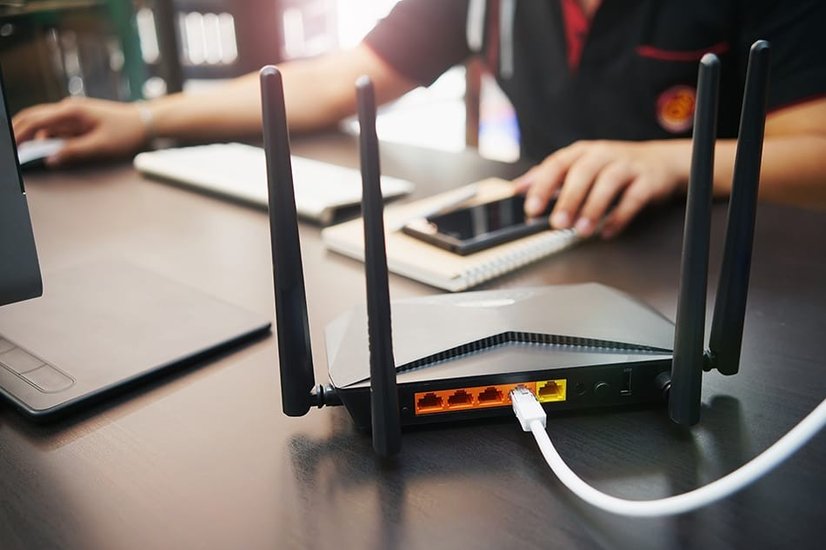
What is the difference between a router and a modem?
Modems and routers are both essential tools in getting online.
- A modem is a device that connects your home to the internet service from your provider. Alone, a modem will not provide you Wi-Fi.
- A router delivers the internet connectivity that connects the devices in your home to Wi-Fi. They need to be connected to a modem with an Ethernet cable.
- A modem-router is a single device that has everything you need to establish a wireless Internet connection in your house by acting as both a modem and router, connecting the Internet and your home network. If you ever hear a device referred to as a “WiFi modem”, it’s a modem-router.
Your Internet Service Provider (ISP) will most likely provide you with a generic modem-router. While this may just get the job done for you, there are plenty of features on third-party routers that often boost Wi-Fi signal and improve upon the range, security, and stability of your network’s connection.
Frequently asked questions
Do you need a modem and a router?
What's the difference between a LAN and a WAN?
When you’re shopping around, you may find the abbreviations LAN and WAN next to some ports on wireless routers.
LAN stands for local area network, and devices (often in the same building) using a LAN use it to connect to the internet, as well as directly communicate with each other through the LAN, without needing to go through the public internet. A LAN can be connected wirelessly, through a wire, or both.
WAN stands for wide area network, and this network connects your router to your service provider. It’s not geographically restricted as a LAN is. Technically, the Internet itself is a WAN.
To connect devices on your home network, use LAN ports. Connect a modem or any device connected to the public Internet to the WAN port.
Can the modem provided by my ISP be replaced with a different one?
Factors to consider when choosing a modem or router
Frequency band
Most routers (including those supplied by your ISP) have dual-band technology, meaning they broadcast a 5 GHz signal and a 2.4GHz signal. Dual-band Wi-Fi allows you to host two Wi-Fi networks simultaneously, and lets devices connect to whichever frequency they’re compatible with - newer devices can usually connect to either.
Here are some pros and cons of dual-band routers.
If you shop around you might also come across tri-band routers - these have an extra 5GHz band and can be suitable for those looking to support a higher number of devices. They're ideal if you have multiple people who game or stream lots of content in your household.
Here are some pros and cons of tri-band routers.
Features
A lot of added features present in store-bought modems, routers and modem-routers won’t be found in your typical ISP-supplied device.
- Beamforming: Beamforming lets you focus a wireless signal towards a specific device or devices, instead of the signal spreading in all directions as it usually would. A router with beamforming determines where your device is and casts a stronger signal in that direction, giving it a more speedy, reliable connection.
- Quality of Service (QoS): QoS is a feature in routers that lets you customise the type of data that gets prioritised on your network. When your network becomes overloaded with Internet traffic, QoS lets you prioritise bandwidth-intensive activities like Netflix or online gaming to reduce lag, and direct less attention to the other things you’re doing on the Internet at the same time. You can also prioritise which devices get better service - often users will prioritise a desktop or a smart TV over mobiles.
- Parental controls: This feature helps you keep your kids safe when they’re exploring online. It makes it easy to view a family member’s internet activity and the types of content they’re looking at, and lets you control their usage by applying content filters and scheduling block times.
- External antennas: Most routers (and some modems) will let you connect an antenna directly to it, letting you focus the power in the direction you need it most, ultimately making for a high performance connection.
- Mobile app control: Being able to manage your WiFi network on your phone lets you do things like block users, track data usage, set internet speeds across different devices, and troubleshoot problems.
- Mesh compatible: A mesh network is a system of Wi-Fi extenders that increases and strengthens the range of your wireless network, and automatically switches you to the extender with the strongest signal. A mesh compatible router or modem will let you add these devices to the network to give you better coverage.
- Built-in malware/anti-virus protection: This keeps your home network safe from viruses and hackers, and is particularly important when you connect lots of devices (not all of which you can realistically ensure are secure) to the same network.
Wireless speed
Wireless routers list their speed in megabits per second (Mbps). What your network needs depends on the needs of those in your home or office - for example, if it’s just you in your house, you may be fine with between 50 to 100 Mbps download speeds and 10 Mbps upload speeds if you’re uploading sizeable files to the Internet.
You’ll need faster speeds as you add more people and connected devices to your network, or if you do more bandwidth-intensive activities, like video streaming, conference calls, or sending large files.
Wi-Fi standard
If you’re confused about all the numbers, letters, and acronyms that describe Wi-Fi standards, you’re not alone. Wrapping your head around Wi-Fi standards can help you cut through the noise and figure out what the differences between them mean for you.
Generally speaking, when choosing a router, you should go for one that runs on a newer standard, so you can take advantage of its better speed and signals.
Some quick pointers to help you out
- The latest Wi-Fi standard is Wi-Fi 6 (802.11ax) - it’s faster and can support more devices than Wi-Fi 5 (802.11ac), its predecessor.
- Earlier standards include 802.11n, g, a, and b.
- Wi-Fi 5 and Wi-Fi 6 routers are often compatible with their earlier counterparts, which is why you may see routers with multiple standards listed.
Number of Ethernet ports
Ethernet or LAN ports let connected devices share data. Most routers have 4 Ethernet ports. If you want your network to accommodate more wired devices (such as multiple computers, a printer, or a network hard drive) on a network, then you should look for a router which lets you hook up all these devices to it simultaneously.
If you’ve found a router you love but you’re still left wishing it had more Ethernet ports, fear not. You can add Ethernet ports to your network by purchasing a switch, which connects to your router and has more Ethernet jacks for you to connect to.
Smart home capabilities
If you have a smart home system, then you’ll want a router that is compatible with your Amazon Alexa, Google Assistant, IFTTT, or other device. Mesh router systems may offer more in terms of wider network coverage for your smart system than a traditional router.
Read reviews on app experience of routers you’re considering. If it’s too difficult to set up, configure, and manage, then having a fast connection may not be all that it’s cracked up to be.
Wi-Fi range
Routers usually only have a certain range (usually of around 50m), so you’ll have to measure the square footage of your home or office to see whether an individual router can keep your whole space connected.
Physical barriers such as walls can also interfere with signal, creating “black spots” around your home that don’t have any signal. You can increase the range of your Wi-Fi router with a Wi-Fi range extender that can be placed strategically to sidestep these obstructions and help transmit signal to these black spots.
Price
Prices for a modem, router, or modem-router vary greatly - you can find some for as little as around $50, while pricier devices can cost you up to $1000. Most will however set you back between $130 and $330.
Some routers only offer extra features - such as a mesh Wi-Fi system - as part of a subscription package. Decide for yourself whether such ongoing costs are worth it for you.
Wrapping up
It can be hard to look past the often free modem-router that your ISP gives you and fork out money for a third-party one. If you do decide you want a new modem, router, or modem-router, there are plenty of options on the market that give you great value for your money.
Ensure you’re considering what kind of support your home or office needs when shopping around, and you’ll be well on your way to creating a well-connected space.
Thank you for your feedback! We're glad to hear that our… Read more